Walk into almost any growing business that is using WhatsApp to manage customer conversations and you will find some version of the same problem. One phone. Two or three people sharing it. A stack of unread threads. Nobody quite sure who already replied to which customer. A message from two days ago that slipped under three newer ones and was never answered. Someone typing a reply only to discover a colleague sent something thirty seconds earlier.
This is not a people problem. Every individual on that team is probably capable and motivated. It is a structure problem. The tool they are using — a single WhatsApp account managed through a personal device with no shared visibility — was not designed for team collaboration. It was designed for one person having conversations with their contacts. Trying to run a business customer communication operation on top of it is like trying to run a warehouse using a single shopping trolley.
Businesses that get WhatsApp organisation right solve this at the infrastructure level — not through stricter protocols or better coordination habits, but through a system where the structure itself keeps conversations visible, assigned, and moving.
Why the Single-Device Setup Breaks Down
The most common WhatsApp setup in small and growing businesses is a single business number installed on one phone, passed between team members or left on a designated device that everyone is supposed to check. This works at very low volumes. It starts failing when more than one or two people need to be involved in managing conversations, or when the volume of messages exceeds what one person can comfortably track.
The failures follow a predictable pattern. First come the duplicated replies — two team members see the same message and both respond, leaving the customer confused about why they received two different answers. Then come the missed messages — a conversation that was visible to whoever last had the phone but not to everyone else, left unread when that person got pulled into something else. Then come the context gaps — a new person picking up an ongoing conversation with no knowledge of what was discussed before, asking the customer to repeat information they already provided.
None of this happens because the team is careless. It happens because the tool provides no shared visibility, no ownership structure, and no history accessible to multiple people simultaneously. The tool is the problem.
What a Multi-Agent Inbox Actually Changes
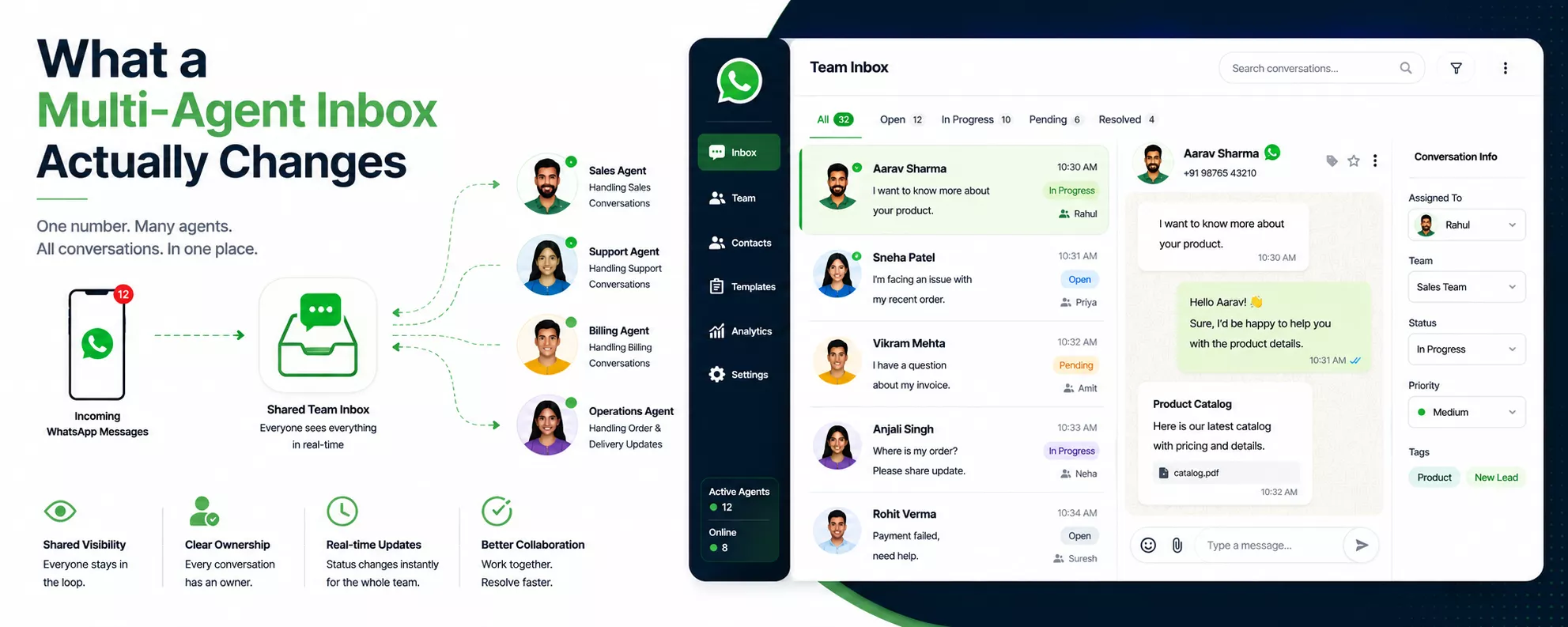
A multi-agent inbox connected to the WhatsApp Business API replaces the single-device setup with a shared dashboard that every team member accesses simultaneously from their own login. The business number stays the same. The customer experience looks identical from the outside. But internally, the entire structure of how conversations are managed shifts.
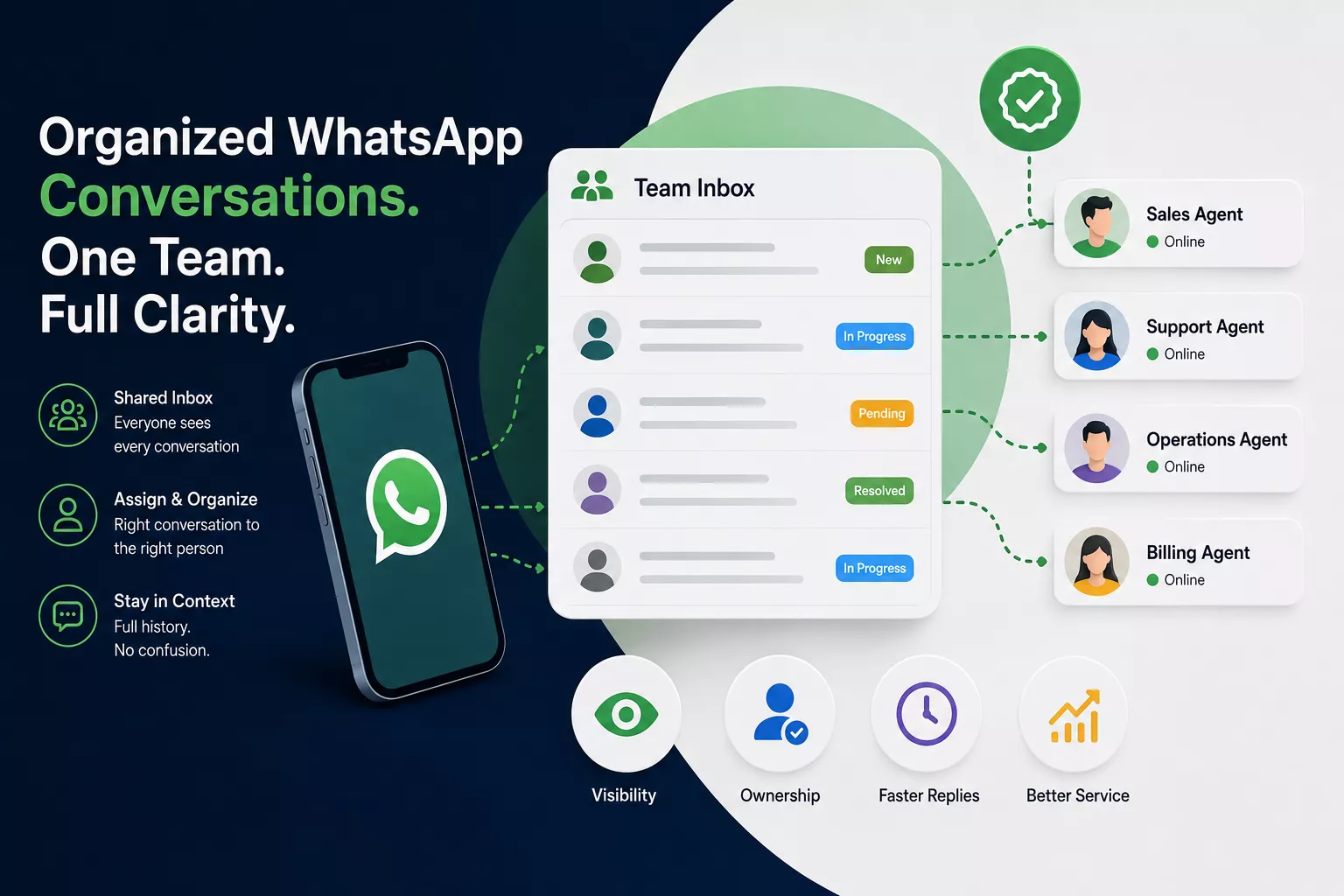
Every incoming conversation is visible to the whole team from the moment it arrives. Nobody can miss a message because it arrived while someone else had the phone. Nobody can double-reply because conversations are assigned to one agent at a time. Nobody can lose context because the full conversation history is attached to every thread, accessible to any team member who picks it up.
The inbox also introduces conversation status — open, in progress, pending, resolved. At any point, a team lead can look at the inbox and see exactly what state every active conversation is in, which agent owns it, how long it has been sitting without a reply, and which threads are approaching resolution. This is not information that requires a meeting or a manual update. It is visible in the dashboard in real time.
Assignment and Routing: Who Gets What and Why
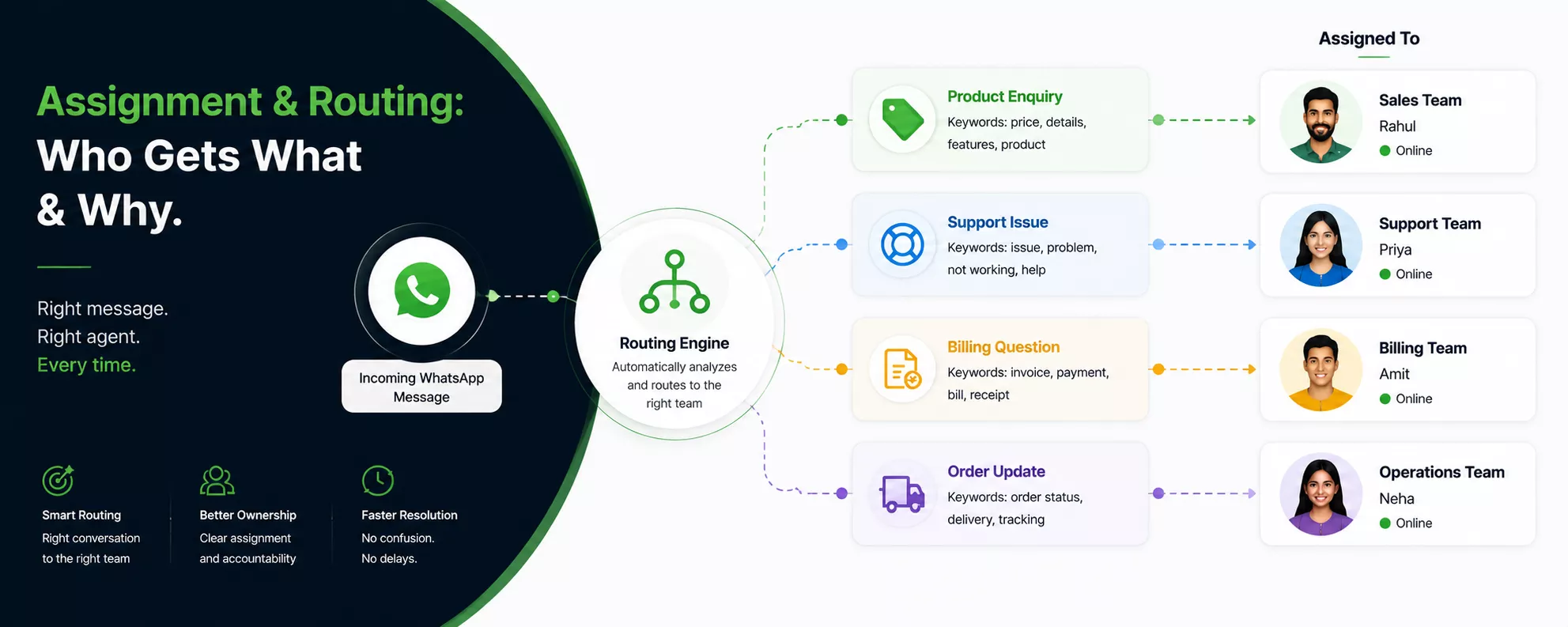
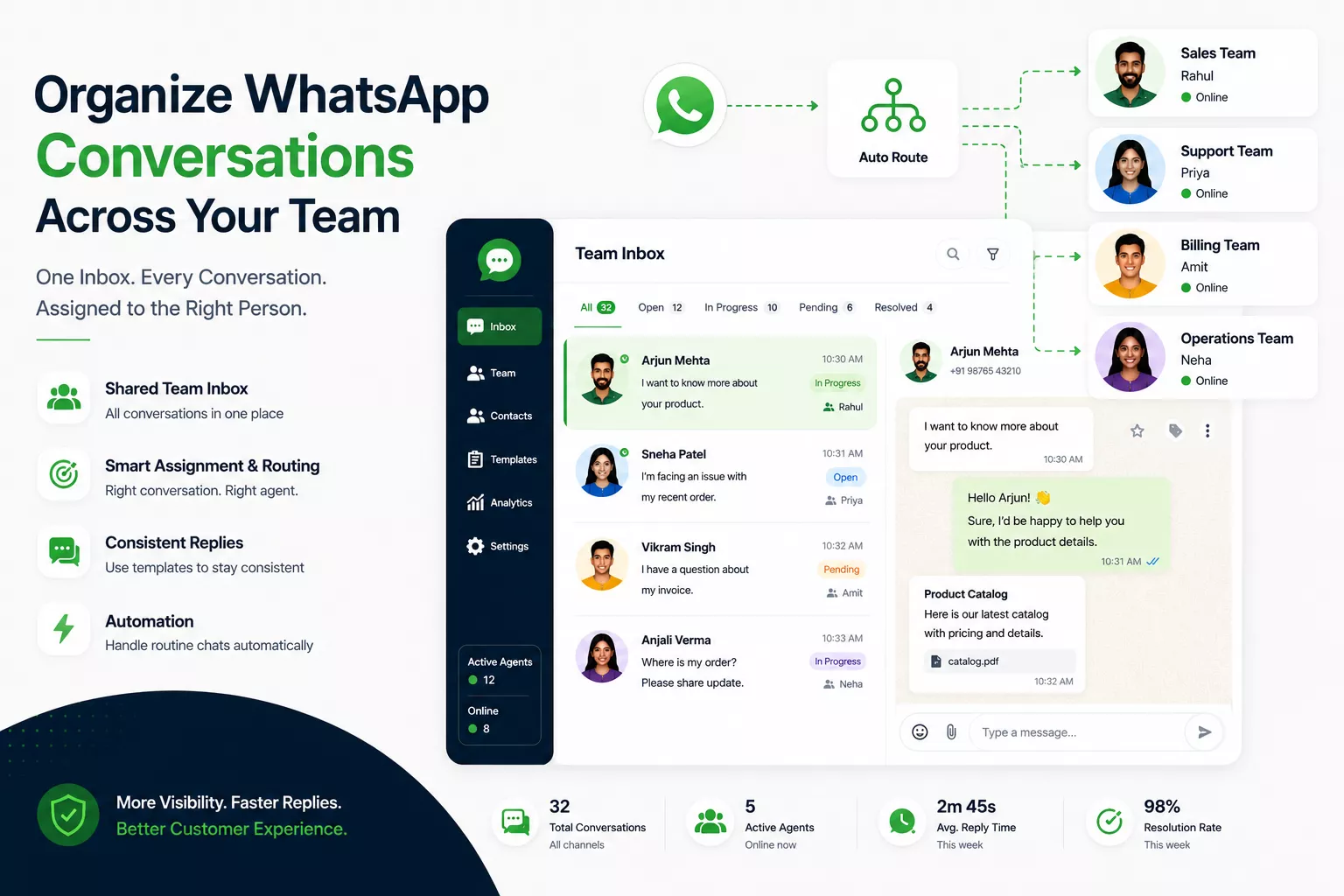
Shared visibility solves the ‘nobody saw it’ problem. Assignment solves the ‘everyone assumed someone else would handle it’ problem. In a properly structured multi-agent inbox, conversations are not sitting in a general pool for anyone to grab. They are assigned — either manually by a supervisor or automatically through routing rules — to a specific agent who owns that conversation until it is resolved.
Routing rules are where the organisational logic gets encoded. A conversation triggered by a WhatsApp campaign about a new product goes to the sales team. A complaint about a delayed order goes to the customer service team. A billing question goes to accounts. A conversation from a VIP contact gets routed to a senior agent. These rules run automatically without a supervisor manually sorting each incoming message — which would be both slow and unscalable as volume grows.
A logistics company with three teams — sales, operations, and customer support — uses routing rules so that every WhatsApp enquiry lands with the right function from the moment it arrives. The sales agent who receives a new shipper enquiry is not simultaneously managing a complaint about a delivery delay. The operations team member handling a consignment update is not fielding pricing questions. Each team works on their category. The inbox keeps everything separated and visible.
Templates: Keeping the Output Consistent Across the Team
Organising the incoming side of WhatsApp — who sees what, who owns which conversation — is half the problem. The other half is making sure what goes out from multiple team members is consistent, accurate, and on-brand.
When five different people are sending WhatsApp messages to customers, the quality and tone of those messages varies by default. One agent writes thorough, warm replies. Another sends clipped three-word answers. A third shares pricing that was accurate last month but has since been updated. None of this is intentional — it is the natural result of having multiple individuals composing responses independently without a standard they are all working from.
Approved WhatsApp templates standardise the outbound layer. For every predictable outbound scenario — a confirmation, a follow-up, a pricing response, a complaint acknowledgement, a re-engagement message — the template defines exactly what the message looks like, approved in advance through Meta’s process. Every agent sends the same quality of communication regardless of individual writing habits or time pressure. Dynamic variables personalise the details without the agent having to compose from scratch.
For team organisation specifically, templates solve a hidden problem: the knowledge gap between experienced and new agents. A new team member using an approved template library can produce customer-facing communication that matches what a senior agent would send — without needing three months of experience to get there. The quality standard is embedded in the template, not in the individual.
Automation: Taking Routine Volume Off the Team Entirely
Even a well-structured team inbox has a capacity ceiling. At some point, the volume of conversations exceeds what the team can manage well, and organisation starts breaking down again. Automated reply flows prevent a large category of conversations from reaching the human team at all.
The conversations automation handles best are the predictable, high-frequency ones that follow a pattern — product availability, pricing, order status, appointment times, standard policy questions. These do not need an agent. They need an accurate, immediate answer. Automation provides that and removes the thread from the human queue entirely, leaving agents to work on conversations that actually require judgment.
This matters for organisation specifically because it changes the composition of what is in the inbox. A team managing 300 raw inbound conversations is fighting to stay on top of an undifferentiated mix of simple and complex. A team managing 90 conversations after automation has filtered out the routine ones is working through a queue where every thread is there because it needs them. The same team, better positioned, with less cognitive overhead.
What Organisation Looks Like When It Works
A team lead opens the inbox at 9 AM. Every overnight conversation has been acknowledged by automation. New inbound from the morning are already routed to the appropriate agents based on category. Agents see their individual queues — not the whole company inbox, just what is assigned to them — with status clearly visible on each thread. No guessing, no overlap, no conversations stuck in limbo because nobody knew whose job it was.
The team lead sees one agent running high volume and redistributes two conversations. A priority escalation from a high-value account gets flagged and reassigned to the most senior agent. An automated report at end of day shows resolution times, response times, and how many conversations were handled per agent. None of this required a meeting, a group chat, or manual coordination — the inbox provided the structure and the visibility to make it all happen.
Organisation at this level is not about discipline. It is about having a system that makes the right thing the easy thing — where the structure guides the team rather than the team trying to impose structure on a tool that was not built for it.
At 24/7 Marketing, we build this system from the ground up — campaigns that bring the right conversations in, approved templates that keep output consistent, automated flows that handle predictable volume, and a multi-agent inbox configured with routing rules, assignment, and tracking that fits how the business actually works.
Ready to replace the shared phone with a system that actually works? Visit 247marketing.in.